

If you’re a workshop owner, mobile mechanic, or serious DIY enthusiast looking for a professional multi-brand diagnostic tool, you’ve likely encountered both the Autocom CDP+ and Delphi DS150e. These names dominate discussions in automotive diagnostic forums, marketplace listings, and workshop equipment catalogs. But here’s the question that confuses many buyers: are these actually different tools, or are you looking at the same device with different branding? In this comprehensive comparison, we’ll reveal the truth about autocom delphi diagnostic systems, examine their technical specifications, compare original equipment versus clones, and provide practical buying advice to help you make an informed decision.
What are Autocom and Delphi diagnostic tools? The Autocom CDP+ and Delphi DS150e are PC-based multi-brand vehicle diagnostic interfaces that connect to cars and trucks via the OBD2 port. They work with comprehensive diagnostic software to read fault codes, view live data, perform actuator tests, and execute advanced functions like ECU coding and service resets across virtually all European vehicle brands.
What Are Autocom CDP+ and Delphi DS150e?
Brief History and Background
The Autocom and Delphi diagnostic systems emerged in the early 2000s as professional-grade alternatives to expensive manufacturer-specific diagnostic equipment. Autocom, a Swedish company established in 1991, developed diagnostic software and hardware specifically for the European automotive market. The company focused on creating user-friendly, comprehensive diagnostic solutions that could handle multiple vehicle brands through a single interface.
Delphi, originally part of the automotive components giant Delphi Technologies, developed the DS150e as a PC-based diagnostic tool that offered similar multi-brand capabilities. Both systems gained popularity among independent workshops, mobile mechanics, and vehicle inspection services throughout Europe because they provided dealer-level diagnostics at a fraction of the cost of brand-specific tools.
Today, these diagnostic systems are recognized as industry standards for multi-brand vehicle diagnostics in European workshops. They’re particularly valued for their extensive vehicle coverage, regular software updates, and ability to perform advanced diagnostic functions beyond simple code reading.
The Surprising Truth: They’re Essentially the Same Device
Here’s what most buyers don’t realize: the Autocom CDP+ and Delphi DS150e share identical internal hardware architecture. Open up the plastic casing of either device, and you’ll find the same circuit board design, the same processor, and the same communication chips. The primary differences are purely cosmetic—the color of the plastic housing and the logo printed on the case.
This isn’t a secret in the diagnostic tool industry, but it’s rarely advertised. Both devices function as Vehicle Communication Interfaces (VCIs) that translate between your computer and the vehicle’s various control modules. The same VCI hardware can typically run Autocom software, Delphi software, or even WURTH WOW software without any modifications.
The confusion in the market exists because both original manufacturers and clone producers maintain separate branding. This creates the illusion of choice when, in reality, you’re choosing between different software packages and quality levels of the same fundamental hardware design. Understanding this truth is the first step toward making an informed purchasing decision.
Hardware Architecture: Single-Board vs Dual-Board Designs
Understanding the Two Main Configurations
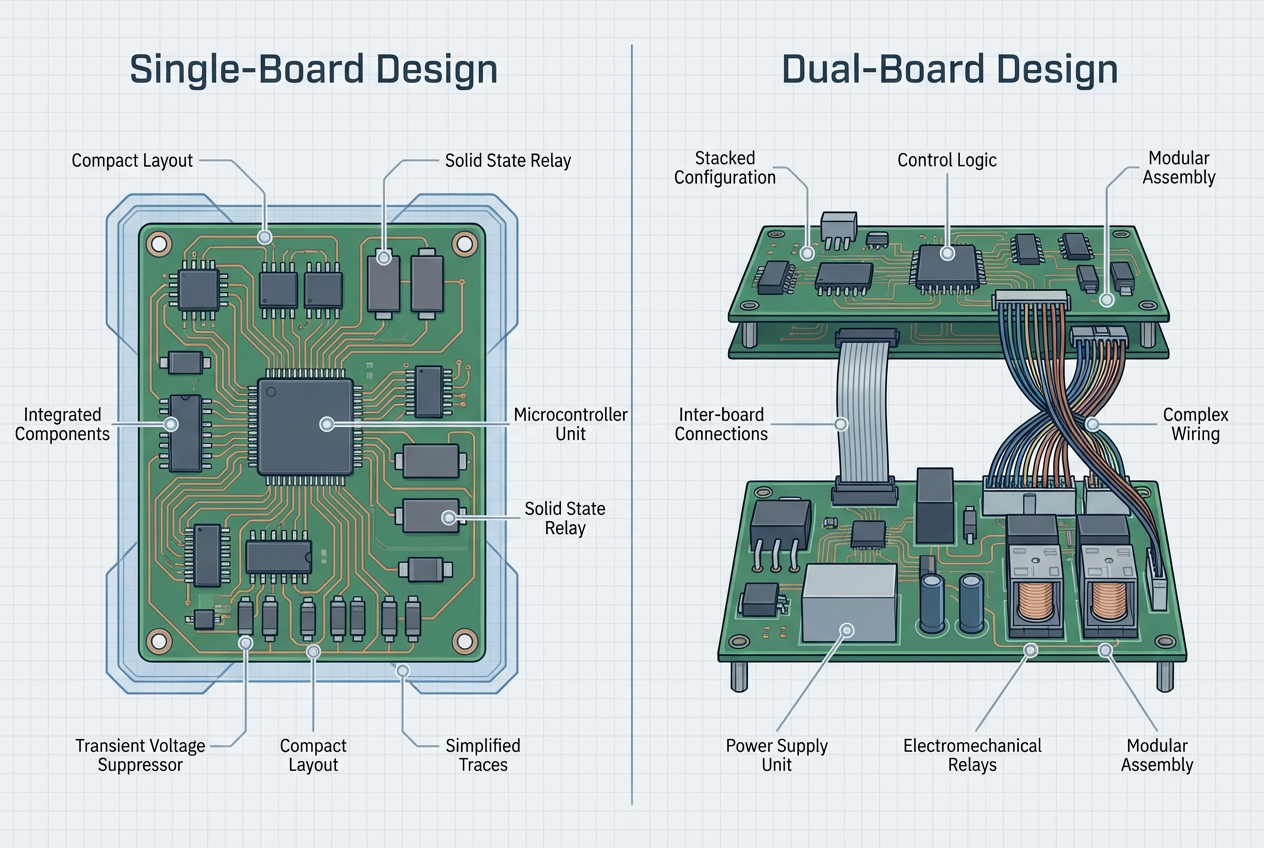
The clone market—which represents the vast majority of Autocom and Delphi devices available for purchase—produces these VCIs in two distinct internal configurations that significantly impact performance and reliability.
Dual-Board (2-PCB) Design: The older configuration uses two separate printed circuit boards stacked inside the housing. These dual-board units are typically built around an ARM STM32F processor and were the standard design for many years. While a well-manufactured dual-board unit can function adequately, they’re increasingly associated with compatibility issues, particularly when using newer software versions (2020.23 and later) with certain vehicle makes like BMW. The dual-board design was originally intended for software versions up to approximately 2017, though some manufacturers claim compatibility with newer releases.
Single-Board (1-PCB) Design: The newer configuration integrates all electronic components onto a single printed circuit board. This modern design offers several advantages: better compatibility with recent software updates, more reliable communication with newer vehicles, and generally improved build quality. Users consistently report greater success connecting to a wider range of vehicles and fewer operational issues with single-board VCIs. These units typically feature a 6-digit serial number, which is required by newer diagnostic software versions.
| Feature | Single-Board (1-PCB) | Dual-Board (2-PCB) |
|---|---|---|
| Design Era | Modern (2018+) | Older (pre-2018) |
| Software Compatibility | 2020-2021+ versions | Up to 2017 (limited newer) |
| Reliability | Generally higher | Variable |
| Vehicle Coverage | Broader, including newer models | Good for older vehicles |
| Serial Number | 6-digit (required for new software) | Often lacks proper serial |
| Price Range (Clone) | €120-€200 | €50-€120 |
| Recommended | ✅ Yes | ⚠️ Only if high quality |
Critical Hardware Components That Determine Quality
The significant performance variance among clone devices stems directly from the quality of their internal components. For professionals assessing a potential purchase, understanding these critical components is essential:
- Relays: The electromechanical relays switch communication lines between different protocols (K-line, L-line, CAN). High-quality units use 5V Japanese-made NEC relays, specifically models EA2-5 or EA2-5NU. These relays are reliable and rated for the voltage requirements of automotive diagnostics. Lower-quality clones substitute 4.5V relays or unbranded alternatives that are prone to failure, especially during extended diagnostic sessions or when working with trucks.
- Suppressors: The transient voltage suppressor protects the VCI from voltage spikes, which are particularly common in 24V truck systems. A quality unit will have a suppressor rated for 29-32V with markings such as BEZ (5SMCJ24CA for bidirectional) or GEZ/GFK (5SMCJ24A for unidirectional). An incorrectly rated suppressor—often 24V or lower in cheap clones—will cause the device to overheat during use and eventually fail.
- Microcircuits: The implementation of K-line and L-line communication protocols should utilize the Si9241A microcircuit, which you can identify by the “9241A” marking on the chip. This specific integrated circuit ensures stable communication with older vehicles that use these protocols. Counterfeit or substitute chips lead to communication failures with many European vehicles manufactured before 2008.
- Zener Diodes: To protect the K-line from overvoltage and prevent signal distortion, the circuit board must contain Zener diodes rated for 27-30 volts. Some low-quality manufacturers substitute cheaper standard diodes or incorrectly rated Zener diodes, which can lead to the failure of the field-effect transistor (FET) and render the K-line communication completely non-functional.
- CAN Communication: The Controller Area Network (CAN) bus is the primary communication protocol for vehicles manufactured after 2008. Quality VCIs have properly implemented CAN filters and secure connections. Low-quality clones may have an unconnected CAN communication channel or missing/poor-quality CAN filters, resulting in intermittent or failed communication with modern vehicles.
How to Inspect Hardware Quality Before Buying
If you’re considering purchasing a clone device, internal inspection is non-negotiable. Any reputable seller should allow you to examine the circuit board before completing the purchase. Here’s a step-by-step inspection guide:
Step 1: Open the Housing – Most VCIs are held together with screws hidden under rubber feet or labels. Carefully remove these and open the case to expose the circuit board.
Step 2: Identify Board Configuration – Count the number of separate PCBs. A single-board design is preferable. If it’s dual-board, look for the revision number printed on the main board—v3.0 is the most stable dual-board revision.
Step 3: Inspect the Relays – Locate the relays (small rectangular components, usually black or white). Check for “NEC” branding and model numbers EA2-5 or EA2-5NU. If you have a multimeter, measure the coil resistance: approximately 178 ohms indicates a 5V relay (good), while 145 ohms indicates a 4.5V relay (inferior).
Step 4: Check the Suppressor – Find the suppressor (usually a larger component near the OBD connector). Look for markings BEZ, GEZ, or GFK followed by voltage ratings. Verify it’s rated for 29-32V, not 24V or lower.
Step 5: Verify Microcircuits – Locate the communication chips and look for “9241A” markings. The presence of this specific chip indicates proper K-line/L-line implementation.
Step 6: Examine Overall Build Quality – Check for cold solder joints, missing components, or obvious damage. The board should look professionally manufactured with clean solder work.
Red Flags to Avoid:
– Seller refuses to open the device for inspection
– Excessive heating during a test connection
– Missing or obviously damaged components
– Handwritten labels or modifications
– No visible serial number or “000000” serial
Software Capabilities and Vehicle Coverage
One of the key advantages of the Autocom/Delphi platform is its software flexibility. A single VCI can run multiple software packages, giving you options for different diagnostic approaches and vehicle coverage.
Autocom CARS Software
The Autocom CARS software package is designed specifically for passenger cars and light commercial vehicles. It represents one of the most comprehensive diagnostic solutions available for the European market, with coverage that includes approximately 95% of the European passenger vehicle fleet.
Coverage Statistics:
– Over 1,500 vehicle models supported
– More than 45,000 unique system selections
– Support for fuel, hybrid, and electric vehicles
– Coverage from 1988 onwards for most brands
The software receives monthly database updates that add new vehicle models, expand system coverage, and introduce new diagnostic functions. Major feature releases occur twice per year, adding capabilities like new service functions, enhanced ADAS calibration support, and improved user interface elements.
Supported Vehicle Brands Include: Audi, BMW, Citroën, Fiat, Ford, Mercedes-Benz, Opel/Vauxhall, Peugeot, Renault, SEAT, Škoda, Volkswagen, Volvo, and dozens of other European, Asian, and American brands.
Autocom TRUCKS Software
For workshops that service commercial vehicles, the Autocom TRUCKS software package provides comprehensive coverage for heavy-duty applications:
Coverage Statistics:
– Over 780 commercial vehicle models
– Approximately 20,000 unique system selections
– Coverage from 1995 onwards
– Real OE (Original Equipment) access for select brands
The TRUCKS software supports diagnostics on heavy commercial vehicles, buses, trailers, and specialized equipment. It includes specific functions for air brake systems, trailer ABS, tachograph diagnostics, and other commercial vehicle-specific systems.
Core Diagnostic Functions
Both Autocom and Delphi software platforms provide an extensive suite of diagnostic capabilities that far exceed basic OBD2 code reading:
System Identification and Scanning:
– Intelligent System Identification (ISI): Automatically identifies the type of control unit in the vehicle, ensuring correct communication parameters
– Intelligent System Scan (ISS): Scans all accessible ECUs and provides a consolidated report of all stored fault codes across all systems
Diagnostic Functions:
– Read and erase Diagnostic Trouble Codes (DTCs) from all vehicle systems
– View live data streams from multiple control modules simultaneously
– Graph and record data for analysis (Flight Recorder function)
– Freeze frame data capture at the moment a fault occurs
– Reading fault codes with detailed descriptions and troubleshooting guidance
Active Testing and Adjustments:
– Actuator tests and component activation (test fuel injectors, activate ABS solenoids, cycle HVAC actuators)
– ECU coding and adaptation for component replacement or feature activation
– Service functions including oil service reset, DPF regeneration, brake pad reset, steering angle calibration
– ADAS calibration support for camera and radar systems
Advanced Features:
– Secure Gateway access for newer vehicles with enhanced security (requires Plus or Pro license)
– Guided diagnostics with step-by-step troubleshooting procedures
– Professional report generation with fault codes, graphs, and live data
– Multi-language support for international workshops
Software Compatibility: Autocom, Delphi, and WURTH WOW
The hardware flexibility of these VCIs means you’re not locked into a single software ecosystem. The same physical device can typically run:
- Autocom Software: The original Swedish software with extensive European vehicle coverage
- Delphi Software: Functionally similar to Autocom with slightly different interface design
- WURTH WOW Software: A rebranded version with additional features for WURTH customers
Software Version Considerations:
– Older dual-board VCIs work best with software versions 2014.x through 2017.x
– Single-board VCIs support versions 2018.x through 2021.x and beyond
– Newer software versions (2020+) require a 6-digit serial number
– Some vehicle-specific functions may require specific software versions
Operating System Requirements:
– Windows 7 (32-bit or 64-bit)
– Windows 10 (32-bit or 64-bit)
– Windows 11 (64-bit)
– Minimum 4GB RAM recommended, 8GB for optimal performance
– USB 2.0 or Bluetooth 2.0+ for VCI connection
Original vs Clone: Quality and Reliability Comparison
Original Equipment Pricing and Features
Autocom ICON (Current Official Product):
The Autocom ICON represents the current generation of official Autocom diagnostic equipment. Priced at approximately €2,200-€2,500 depending on the license package, it includes:
- Genuine hardware with full warranty (typically 2 years)
- Official software license with guaranteed updates
- Technical support from Autocom
- Training resources and documentation
- Legal compliance for commercial workshop use
- No malware or security risks
License Packages:
– ICON CAR STANDARD: Basic diagnostic functions for passenger vehicles
– ICON CAR PLUS: Adds Secure Gateway access for select brands, guided diagnostics
– ICON CAR PRO: Full feature set including electric vehicle diagnostics, all Secure Gateway access
Delphi Official Equipment:
Original Delphi DS150e units, when available through authorized channels, are priced similarly at €2,000-€2,300. However, Delphi has largely exited the aftermarket diagnostic tool business, making genuine new units difficult to source.
Clone Market Reality
The clone market for Autocom/Delphi VCIs is vast and complex. Prices range from as low as €50 for the cheapest units to €200 for higher-quality clones. This 4x price variation reflects dramatic differences in component quality, reliability, and longevity.
Price Tiers in the Clone Market:
Budget Tier (€50-€80):
– Dual-board design, often older revisions
– Low-quality components (4.5V relays, incorrect suppressors)
– Frequent communication failures
– Short lifespan (months rather than years)
– High risk of DOA (Dead On Arrival)
Mid-Range (€80-€120):
– Mix of dual-board and single-board designs
– Variable component quality
– May work adequately for basic diagnostics
– Reliability is unpredictable
– Better than budget but still risky
Premium Clone (€120-€200):
– Single-board design
– Quality components (5V NEC relays, proper suppressors)
– Reliable communication with most vehicles
– Can last several years with proper care
– Best value for money if you can’t afford original
Common Sources:
– AliExpress and eBay (direct from Chinese manufacturers)
– Local automotive tool suppliers (often rebranded)
– Online diagnostic tool specialists
– Workshop equipment distributors
Clone Quality Indicators
| Aspect | Original Equipment | High-Quality Clone | Low-Quality Clone |
|---|---|---|---|
| Cena | €2,000-€2,500 | €120-€200 | €50-€80 |
| Hardware | Guaranteed quality | Single-board, good components | Dual-board, cheap components |
| Warranty | 2 years official | None or 30 days | None |
| Software | Licensed, clean | Cracked, malware risk | Cracked, high malware risk |
| Updates | Official, guaranteed | Community, uncertain | Rarely updated |
| Support | Professional | Forums, sellers | None |
| Reliability | Excellent | Good | Poor |
| Lifespan | 5-10+ years | 2-5 years | Months |
| Vehicle Coverage | Full, guaranteed | Full (if working) | Partial, unreliable |
| Legal for Commercial Use | ✅ Yes | ❌ No | ❌ No |
Software Security Concerns with Clones
One of the most significant drawbacks of clone devices is the software security risk. The diagnostic software included with clones is “cracked” or “hacked” to bypass licensing requirements, and this cracked software is frequently bundled with malware, viruses, and potentially unwanted programs (PUPs).
Common Security Issues:
– Trojan horses embedded in installation files
– Keyloggers that capture passwords and sensitive data
– Cryptocurrency miners that slow down your computer
– Backdoors that allow remote access to your system
– Adware and browser hijackers
Installation instructions for clone software often explicitly tell you to:
– Disable your antivirus software
– Turn off Windows Defender
– Disable your firewall
– Allow all security warnings
These are massive red flags that should concern any professional workshop owner.
Best Practice for Clone Software:
If you choose to use a clone device, follow these security protocols:
- Use a Dedicated Laptop: Purchase an inexpensive used laptop exclusively for diagnostics. Never connect this laptop to your main workshop network or use it for email, banking, or other sensitive activities.
- Isolate from Network: Keep the diagnostic laptop offline except when absolutely necessary for software updates. Never connect it to your business network.
- No Sensitive Data: Don’t store customer information, financial records, or any sensitive business data on the diagnostic laptop.
- Regular Backups: Back up the working software installation to external media so you can restore it if the system becomes compromised.
- Accept the Risk: Understand that you’re accepting security risks in exchange for cost savings. This may not be acceptable for all business situations.
Head-to-Head Comparison: Key Criteria
Price Comparison
| Feature | Autocom CDP+ Original | Delphi DS150e Original | High-Quality Clone |
|---|---|---|---|
| Initial Cost | €2,200-€2,500 | €2,000-€2,300 | €120-€200 |
| Annual Updates | €300-€500 | €300-€500 | Free (cracked) |
| Warranty | 2 years | 2 years | None/30 days |
| Software License | Official, perpetual | Official, perpetual | Cracked, uncertain |
| Vehicle Coverage | Full, guaranteed | Full, guaranteed | Full (if quality) |
| Technical Support | Professional | Professional | Community forums |
| Reliability | Excellent | Excellent | Variable |
| Legal for Business | ✅ Yes | ✅ Yes | ❌ No |
| 5-Year Total Cost | €3,700-€5,000 | €3,500-€4,800 | €120-€400 |
ROI Considerations for Workshops:
– A professional workshop performing 10 diagnostics per week at €50 each generates €26,000 annually
– Original equipment pays for itself in approximately 2 months of operation
– However, many small workshops and mobile mechanics can’t afford the upfront investment
– Quality clones offer a lower barrier to entry but with ongoing reliability concerns
Vehicle Compatibility
Both Autocom and Delphi software provide excellent coverage for European vehicles, with some limitations for other markets:
European Brands (Excellent Coverage):
– German: Audi, BMW, Mercedes-Benz, Opel, Porsche, Volkswagen
– French: Citroën, Peugeot, Renault
– Italian: Alfa Romeo, Fiat, Lancia
– British: Jaguar, Land Rover, Mini, Vauxhall
– Swedish: Saab, Volvo
– Spanish: SEAT
Asian Brands (Good Coverage):
– Japanese: Honda, Mazda, Mitsubishi, Nissan, Subaru, Suzuki, Toyota
– Korean: Hyundai, Kia
– Chinese: Growing coverage for brands sold in Europe
American Brands (Limited Coverage):
– Ford and General Motors: Good coverage for European models
– Chrysler/Dodge/Jeep: Basic OBD2 functionality, limited advanced features
– Tesla: Not supported
Specific Brand Notes:
– BMW: Excellent coverage but newer models (2018+) may have limited functionality due to security gateways
– VAG Group (VW/Audi/SEAT/Škoda): Comprehensive coverage but consider dedicated VCDS tool for advanced coding
– PSA Group (Peugeot/Citroën): Excellent coverage including service functions
– Opel/Vauxhall: Full coverage including specific Opel functions
Ease of Use
Software Interface:
Both Autocom and Delphi software maintain a consistent interface across different vehicle brands, which significantly reduces the learning curve. Once you learn the software with one vehicle, you can apply that knowledge to any other supported vehicle.
Learning Curve:
– Beginners: Expect 2-4 weeks to become comfortable with basic functions
– Experienced Technicians: 1-2 days to learn the interface if familiar with other diagnostic tools
– Advanced Functions: Ongoing learning as you encounter new vehicle systems and features
Help Functions:
The software includes detailed help texts for most diagnostic functions, including:
– Step-by-step instructions for service procedures
– Explanations of fault codes with possible causes
– Wiring diagrams and component locations (for some vehicles)
– Guided diagnostics that walk you through troubleshooting procedures
Report Generation:
Built-in reporting functions allow you to create professional diagnostic reports for customers, including:
– List of all scanned systems and fault codes
– Graphs of live data recordings
– Before/after comparisons for repairs
– Customizable workshop branding
Connectivity Options
Bluetooth Connection:
– Advantages: Wireless freedom, no cable clutter, can move around vehicle
– Disadvantages: Connection stability issues, interference from other devices, limited range (typically 10 meters)
– Best For: Mobile mechanics, quick diagnostics, situations where cable routing is difficult
USB Connection:
– Advantages: Stable connection, no interference, no battery concerns, faster data transfer
– Disadvantages: Cable can be cumbersome, limited by cable length (typically 3-5 meters)
– Best For: Workshop bench diagnostics, extended diagnostic sessions, data logging
Connection Stability Issues:
Many users report that USB connections are more reliable than Bluetooth, particularly for:
– Extended diagnostic sessions
– Data logging and recording
– ECU programming and coding functions
– Working with vehicles that have weak OBD2 port power
For professional workshop use, having both connectivity options available is ideal, allowing you to choose based on the specific diagnostic situation.
Update and Support
Official Equipment:
– Regular monthly software updates via official channels
– Major feature releases twice per year
– Professional technical support via phone and email
– Access to training materials and webinars
– Guaranteed compatibility with new vehicle models
Clone Devices:
– Software updates available through community forums and file-sharing sites
– No guarantee of compatibility with new updates
– Support limited to seller (often minimal) and community forums
– Risk of malware in downloaded updates
– May require new hardware for major software version changes
Common Problems and Troubleshooting
Connection Issues
Even with quality hardware, connection problems can occur. Here’s a systematic troubleshooting approach:
Problem 1: Vehicle Not Detected
- Check Physical Connection: Ensure the VCI is fully inserted into the OBD2 port. Some vehicles have tight ports that require firm pressure.
- Verify Power: The VCI should have indicator lights showing power. If no lights, check the vehicle’s OBD2 port fuse (typically 10-15A in the fuse box).
- Try Different Connection Method: If using Bluetooth, switch to USB or vice versa. This isolates whether the issue is with the VCI or the connection method.
- Check Software Settings: Ensure the correct VCI type is selected in the software settings. Some software versions require manual VCI selection.
- Test with Another Vehicle: If possible, test the VCI with a different vehicle to determine if the issue is vehicle-specific or VCI-related.
Problem 2: Communication Errors Mid-Session
- Check Battery Voltage: Low vehicle battery voltage (below 12V) can cause communication failures. Charge the battery or use a battery maintainer.
- Reduce Electrical Load: Turn off all vehicle accessories (radio, lights, climate control) during diagnostics to stabilize voltage.
- Check for Interference: Bluetooth connections can be disrupted by other wireless devices. Move away from Wi-Fi routers, other Bluetooth devices, and metal structures.
- Update Firmware: Ensure the VCI firmware is up to date. Firmware updates can resolve communication stability issues.
Problem 3: Bluetooth Pairing Problems
- Remove Old Pairings: Delete any previous pairings of the VCI from your computer’s Bluetooth settings and re-pair from scratch.
- Check Bluetooth Adapter: Some laptop Bluetooth adapters are incompatible. Try an external USB Bluetooth dongle (Bluetooth 4.0 or newer recommended).
- Verify PIN Code: Most VCIs use PIN 0000 or 1234. Check the documentation for your specific device.
- Disable Power Saving: Windows power management can turn off Bluetooth adapters. Disable power saving for the Bluetooth adapter in Device Manager.
Problem 4: USB Driver Issues
- Install Correct Drivers: Ensure you’ve installed the USB drivers included with the software. Windows generic drivers often don’t work properly.
- Try Different USB Ports: Some USB 3.0 ports have compatibility issues. Try USB 2.0 ports instead.
- Check Device Manager: Look for yellow exclamation marks in Device Manager indicating driver problems. Uninstall and reinstall the device.
- Disable USB Selective Suspend: In Windows Power Options, disable USB selective suspend to prevent the system from powering down the VCI.
Software Activation Problems
6-Digit Serial Number Requirements:
Newer software versions (2020+) require a 6-digit serial number for activation. Older dual-board VCIs often lack proper serial numbers or have “000000” which won’t activate.
Solution: If your VCI has no serial or “000000,” you may need to:
– Use older software versions (2017.x or earlier)
– Purchase a single-board VCI with proper serial number
– Use serial number generators (risky, may not work with all software versions)
Firmware Compatibility:
The VCI firmware must match the software version. Mismatched firmware causes activation failures and communication errors.
Solution:
– Update VCI firmware using the firmware update tool included with the software
– Ensure you’re using firmware designed for your specific board type (single vs dual)
– Some VCIs require specific firmware versions for specific software versions
Windows Compatibility Issues:
Some software versions have specific Windows requirements:
– Version 2014-2017: Windows 7 (32-bit or 64-bit)
– Version 2018-2019: Windows 7 or Windows 10
– Version 2020-2021: Windows 10 or Windows 11
Solution: Use a compatible Windows version or try compatibility mode settings.
Hardware Failures
Relay Burnout Symptoms:
– Clicking sound from VCI but no communication
– Works with some vehicles but not others
– Intermittent connection that fails after a few minutes
Diagnosis: Open the VCI and visually inspect relays for burn marks or melted plastic. Test relay coil resistance with a multimeter.
Solution: Replace failed relays with quality 5V NEC relays. This requires soldering skills.
Overheating During Use:
– VCI becomes very hot to touch
– Communication fails after 10-15 minutes
– Burning smell from VCI
Cause: Incorrectly rated suppressor or resistors, often in cheap clones.
Solution: This indicates a fundamental design flaw. Replace the VCI with a quality unit rather than attempting repair.
K-line Communication Failures:
– Can’t communicate with older vehicles (pre-2008)
– Works fine with newer CAN-bus vehicles
– Error messages about K-line or L-line
Cause: Failed Zener diodes, counterfeit Si9241A chips, or damaged K-line circuitry.
Solution: Requires component-level repair or VCI replacement. Not economically viable for cheap clones.
CAN Bus Connection Problems:
– Can’t communicate with vehicles from 2008 onwards
– Works with older vehicles but not newer ones
– Specific error about CAN communication
Cause: Poor quality or missing CAN filters, unconnected CAN channel.
Solution: This is a fundamental hardware issue requiring VCI replacement.
Vehicle-Specific Issues
BMW E60 and Security Gateway Limitations:
Many users report that even quality clones struggle with BMW vehicles, particularly E60 series and newer models with security gateways. These vehicles implement enhanced security that limits third-party diagnostic tool access.
Omezení:
– Can read basic fault codes
– Can view some live data
– Cannot perform coding or programming
– Cannot access some control modules
Solution: For serious BMW work, consider a dedicated BMW tool or official equipment with Secure Gateway access.
Newer Vehicles with Enhanced Security:
Vehicles from approximately 2018 onwards increasingly implement security gateways that restrict diagnostic access. This affects all third-party tools, not just clones.
Affected Functions:
– ECU coding and adaptation
– Component programming
– Access to certain control modules
– Some service functions
Solution: Official equipment with Secure Gateway access (Autocom ICON Plus/Pro) or manufacturer-specific tools may be required for these functions.
Real-World Use Cases and User Experiences
Workshop Owner Perspective
Small Independent Workshop (2-3 Technicians):
For a small workshop performing general repairs and maintenance, the decision between original equipment and a quality clone often comes down to budget and risk tolerance.
Case Study – Quality Clone Success:
A mobile mechanic in Poland purchased a €150 single-board clone in 2021. After careful inspection of the internal components and setup on an isolated laptop, the tool has performed reliably for over 4 years. It’s used for 5-10 diagnostics per week on various European vehicles. The mechanic reports occasional connection issues with newer BMW models but overall satisfaction with the value for money. Total investment: €150 for VCI + €200 for used laptop = €350 total.
Case Study – Original Equipment Investment:
A 3-bay workshop in Germany invested €2,400 in an Autocom ICON in 2023. The workshop performs 15-20 diagnostics per week and values the official support, guaranteed updates, and legal compliance for insurance purposes. The tool paid for itself in approximately 10 weeks of operation. Annual update costs of €400 are considered worthwhile for peace of mind and access to new vehicle coverage.
Cost-Effectiveness Analysis:
– Break-even point for original equipment: 48-50 diagnostic jobs at €50 each
– Risk with clones: Potential failure requiring replacement, no warranty
– Hidden costs of clones: Time spent troubleshooting, potential lost jobs due to tool failure
Mobile Mechanic Applications
Mobile mechanics have specific requirements that influence the original vs clone decision:
Portability Considerations:
– Laptop weight and battery life matter significantly
– Bluetooth connectivity is more convenient than cables in field situations
– Rugged laptop cases protect equipment during transport
Battery Life:
– Diagnostic sessions can drain laptop batteries quickly
– USB-connected VCIs draw power from the laptop
– Bluetooth VCIs have internal batteries that need charging
– Consider a portable power bank or vehicle inverter for extended sessions
Field Reliability:
For mobile mechanics, tool failure in the field means lost time, lost revenue, and unhappy customers. This makes reliability more critical than for workshop-based operations.
Mobile Mechanic Recommendation:
Many successful mobile mechanics use a two-tool strategy:
1. Primary Tool: Quality clone (€150-€200) for routine diagnostics
2. Backup Tool: Budget Bluetooth OBD2 adapter (€50-€80) for basic code reading if primary tool fails
This provides redundancy at a total cost of €200-€280, still far less than original equipment.
DIY Enthusiast Use
For car enthusiasts who want to diagnose and maintain their own vehicles, the professional-grade Autocom/Delphi platform may be overkill.
Considerations for DIY Use:
– Frequency: How often will you actually use the tool?
– Complexity: Do you need advanced functions like coding and programming?
– Learning Curve: Are you willing to invest time learning professional software?
– Security: Are you comfortable with the malware risks of clone software?
Alternative Recommendations for Hobbyists:
Rather than investing in an Autocom/Delphi clone, DIY enthusiasts should consider:
- Vgate vLinker MC+ (€60-€80): Reliable, regular firmware updates, works with multiple apps, no malware concerns
- Vgate iCar Pro 2S (€50-€70): Excellent for iOS and Android apps, good vehicle coverage, user-friendly
- Viaken Products (€80-€120): Based on STN2120/STN1170 chips, better reliability than cheap clones, regular updates
- Brand-Specific Tools: For single-brand enthusiasts (e.g., VAG owners), dedicated tools like VCDS offer better functionality for that specific brand
These alternatives provide 80% of the functionality needed for DIY diagnostics at 30-40% of the cost, without the security concerns of cracked software.
Buying Guide: How to Choose Between Autocom and Delphi
When to Buy Original Equipment
Original equipment makes sense in these situations:
Professional Workshop Requirements:
– You operate a commercial workshop with multiple technicians
– You need warranty coverage for business insurance purposes
– You require official technical support for complex diagnostics
– You want guaranteed compatibility with new vehicle models
– You need legal compliance for commercial diagnostic services
– You can afford the upfront investment and annual update costs
High-Volume Diagnostic Work:
– You perform 10+ diagnostics per day
– Tool reliability directly impacts your revenue
– Downtime from tool failure is unacceptable
– You need consistent, predictable performance
Specialized Applications:
– You work extensively with newer vehicles (2018+) with security gateways
– You need Secure Gateway access for specific brands
– You perform ECU programming and coding regularly
– You require guided diagnostics and advanced features
Legal and Compliance Reasons:
– Your business insurance requires certified equipment
– You need to demonstrate due diligence for liability purposes
– You operate in jurisdictions with strict regulations on diagnostic equipment
When a Quality Clone Makes Sense
Quality clones can be appropriate for:
Budget-Conscious Small Workshops:
– You’re starting a new workshop with limited capital
– You perform moderate diagnostic work (5-10 jobs per week)
– You can accept some reliability risk in exchange for cost savings
– You have backup diagnostic options available
Mobile Mechanics Starting Out:
– You’re establishing a mobile mechanic business
– You need to minimize initial investment
– You can dedicate a laptop exclusively for diagnostics
– You’re comfortable with the security implications
Backup Diagnostic Tool:
– You already have primary diagnostic equipment
– You want a backup tool for redundancy
– You need a portable option for field work
– Cost is a primary concern
Specific Vehicle Focus:
– You primarily work on older vehicles (pre-2015)
– You don’t need advanced coding and programming
– Basic diagnostics and service functions are sufficient
– You’re willing to accept limitations with newer vehicles
What to Look for When Buying a Clone
If you decide a clone is appropriate for your situation, follow this checklist:
1. Verify Single-Board Design
– Ask the seller to confirm it’s a single-board (1-PCB) version
– Request photos of the internal circuit board
– Avoid dual-board versions unless you’re experienced and can verify v3.0 revision
2. Inspect Internal Components
– Open the device and examine the circuit board
– Verify 5V NEC relays (EA2-5 or EA2-5NU models)
– Check suppressor rating (29-32V, BEZ/GEZ markings)
– Look for Si9241A microcircuit markings
– Examine overall build quality and solder work
3. Check Seller Reputation and Reviews
– Read detailed reviews from other buyers
– Look for feedback specifically about longevity and reliability
– Avoid sellers with many complaints about DOA units
– Check if seller offers any warranty or return period
4. Confirm 6-Digit Serial Number
– Verify the device has a proper 6-digit serial number
– Avoid devices with “000000” or no serial number
– This is essential for newer software versions (2020+)
5. Test Before Full Payment
– If buying locally, request to test the device before completing purchase
– Bring a laptop with software installed
– Test connection to a vehicle
– Verify all indicator lights function properly
6. Prepare Isolated Laptop
– Purchase an inexpensive used laptop exclusively for diagnostics
– Install Windows 10 or Windows 11
– Never connect this laptop to your business network
– Don’t use it for email, banking, or sensitive data
– Accept that the software will contain malware
7. Verify Included Accessories
– USB cable (if USB version)
– OBD2 extension cable (useful for some vehicles)
– Software installation files or download links
– Basic documentation or setup guide
8. Understand the Limitations
– No warranty or very limited warranty (30 days typical)
– No official support
– Software updates are uncertain
– May not work with all vehicles
– Potential legal issues for commercial use
Recommended Alternatives
If neither original equipment nor clones seem appropriate, consider these alternatives:
For VAG Vehicles (VW/Audi/SEAT/Škoda):
– Ross-Tech VCDS (€300-€400): The gold standard for VAG diagnostics, official support, regular updates, extensive coding capabilities
For Budget-Conscious Users:
– Vgate vLinker MC+ (€60-€80): Reliable multi-protocol adapter, works with multiple apps, regular firmware updates
– Vgate iCar Pro 2S (€50-€70): Excellent for smartphone-based diagnostics, user-friendly apps
For Professional Multi-Brand Work:
– Autel MaxiCOM series (€1,500-€3,000): Professional-grade alternative with official support
– Launch X431 series (€1,200-€2,500): Comprehensive coverage with regular updates
For Specific Brands:
– OPCOM for Opel/Vauxhall (€60-€100): Dedicated Opel diagnostics
– BMW-specific tools for serious BMW work
– Mercedes Star Diagnostic clones for Mercedes focus
Frequently Asked Questions
Are Autocom CDP+ and Delphi DS150e the same?
Yes, the Autocom CDP+ and Delphi DS150e share identical internal hardware architecture. They use the same circuit boards, processors, and communication chips. The only differences are the external plastic casing color and the logo printed on the device. Both function as Vehicle Communication Interfaces (VCIs) that can run Autocom, Delphi, or WURTH WOW software without modifications. When you’re choosing between them, you’re really choosing between different software packages and quality levels of the same fundamental hardware design.
Can I use Autocom software with a Delphi DS150e interface?
Yes, the VCI hardware is fully compatible with multiple software platforms. A Delphi DS150e interface can run Autocom software, and an Autocom CDP+ interface can run Delphi software. The same hardware can also run WURTH WOW software. This flexibility is one of the advantages of this platform—you’re not locked into a single software ecosystem. However, you’ll need to ensure your VCI has the appropriate firmware version for the software you want to use, and newer software versions (2020+) require a 6-digit serial number regardless of which brand of VCI you have.
Are cheap clones worth buying?
It depends entirely on the internal quality of the clone. High-quality clones with single-board design, proper components (5V NEC relays, correctly rated suppressors, Si9241A microcircuits), and good build quality can work reliably for years and provide excellent value for money. However, cheap clones with dual-board designs, inferior components, and poor build quality are unreliable and often fail within months. The key is inspection before purchase—any reputable seller should allow you to examine the internal circuit board. If you can’t inspect the hardware or the seller refuses, avoid that purchase. Budget clones (under €80) are generally not worth the risk, while premium clones (€120-€200) can be viable if you verify the quality.
What’s the difference between single-board and dual-board versions?
Single-board (1-PCB) versions integrate all electronic components onto one printed circuit board, while dual-board (2-PCB) versions spread the electronics across two separate boards. Single-board designs are newer (2018+), more reliable, and offer better compatibility with recent software versions (2020-2021+). They typically include a 6-digit serial number required by newer software. Dual-board designs are older (pre-2018), were designed for software up to 2017, and often have compatibility issues with newer vehicles and software versions. For new purchases, single-board versions are strongly recommended. If considering a dual-board version, only purchase if it’s revision v3.0 and you can verify the component quality.
Do I need a special laptop for these diagnostic tools?
For original equipment with licensed software, any laptop meeting the system requirements (Windows 7/10/11, 4GB+ RAM, USB 2.0 or Bluetooth) will work fine. However, for clone devices with cracked software, you should use a dedicated laptop exclusively for diagnostics. The cracked software typically contains malware, viruses, and potentially unwanted programs. This dedicated laptop should never be connected to your business network, never used for email or banking, and never contain sensitive customer data. This isolation protects your business systems from the security risks inherent in cracked diagnostic software. An inexpensive used laptop (€150-€250) is sufficient for this purpose.
Which vehicles are supported?
The Autocom CARS software covers approximately 95% of the European passenger vehicle fleet, including over 1,500 models and 45,000+ system selections. Coverage includes all major European brands (VW, Audi, BMW, Mercedes, Peugeot, Citroën, Renault, Opel, Volvo, etc.), most Asian brands (Toyota, Honda, Nissan, Hyundai, Kia, etc.), and European-market American vehicles (Ford, GM). Coverage is excellent for vehicles from 1988 onwards. The TRUCKS software covers 780+ commercial vehicle models. However, coverage for American-market vehicles (Chrysler, Dodge, Jeep) is limited to basic OBD2 functionality. Newer vehicles (2018+) with security gateways may have limited functionality for advanced features like coding and programming without Secure Gateway access.
Can these tools do ECU programming and coding?
Yes, both Autocom and Delphi software support ECU coding, adaptation, and some programming functions. You can perform tasks like activating hidden features, adapting new components after replacement, coding new control modules, and making various vehicle adjustments. However, there are limitations: newer vehicles (2018+) with security gateways may restrict these functions to manufacturer tools or require Secure Gateway access (available in Autocom ICON Plus/Pro licenses). Advanced programming tasks like ECU flashing for performance tuning typically require specialized tools. For routine coding and adaptation tasks on vehicles up to 2017, these tools work well. For extensive coding work on specific brands (like VAG), dedicated tools like VCDS offer more comprehensive functionality.
What’s the best alternative for hobbyist use?
For occasional DIY diagnostics, the professional Autocom/Delphi platform is often overkill. Better alternatives for hobbyists include the Vgate vLinker MC+ (€60-€80), which offers reliable multi-protocol communication, works with multiple smartphone and PC apps, receives regular firmware updates, and has no malware concerns. The Vgate iCar Pro 2S (€50-€70) is excellent for smartphone-based diagnostics with user-friendly apps. For single-brand enthusiasts, dedicated tools often provide better value—VAG owners should consider Ross-Tech VCDS, BMW owners might prefer Carly or BimmerCode, and Opel owners can use OPCOM. These alternatives provide 80% of the diagnostic functionality needed for DIY work at 30-40% of the cost, without the complexity and security risks of professional clone tools.
Conclusion: Which Should You Choose?
After this comprehensive comparison, the truth is clear: Autocom CDP+ and Delphi DS150e are essentially the same device with different branding. Your decision shouldn’t be “Autocom or Delphi?” but rather “original equipment, quality clone, or alternative solution?”
Summary of Key Points
Hardware Reality:
– Identical internal architecture between Autocom and Delphi
– Quality matters far more than brand name
– Single-board design is superior to dual-board
– Component quality determines reliability and longevity
Software Capabilities:
– Comprehensive coverage for 95% of European vehicles
– Advanced diagnostic functions beyond basic code reading
– One VCI can run multiple software platforms
– Regular updates essential for new vehicle coverage
Original vs Clone:
– Original equipment: €2,000-€2,500, guaranteed quality, official support
– Quality clones: €120-€200, good value if components verified
– Budget clones: €50-€80, high failure rate, not recommended
– Security risks with clone software require isolated laptop
Critical Success Factors:
– Inspect hardware before buying clones
– Verify single-board design and quality components
– Understand and mitigate security risks
– Have realistic expectations about limitations
Final Recommendations
For Professional Workshops:
If you operate a commercial workshop, perform high-volume diagnostic work, or need guaranteed reliability and support, invest in original equipment. The Autocom ICON (€2,200-€2,500) provides peace of mind, legal compliance, official support, and guaranteed updates. It will pay for itself quickly through reliable daily use.
For Budget-Conscious Users:
If you’re a small workshop, mobile mechanic, or starting out with limited capital, a high-quality clone can provide excellent value. Invest €150-€200 in a single-board clone after thorough inspection of internal components. Set up a dedicated isolated laptop for the cracked software. Accept the limitations and security risks as trade-offs for the cost savings.
For DIY Enthusiasts:
Skip the Autocom/Delphi platform entirely. Instead, invest €50-€80 in a Vgate vLinker MC+ or iCar Pro 2S for reliable, user-friendly diagnostics without malware concerns. For single-brand focus, choose dedicated tools like VCDS for VAG vehicles or OPCOM for Opel.
Take Action
Ready to make an informed decision about your diagnostic tool needs? Explore our comprehensive guide to OBD2 diagnostic tools to compare all available options, or learn the fundamentals of clearing diagnostic trouble codes to get the most from your diagnostic equipment.
Whether you choose original Autocom equipment, a carefully selected Delphi clone, or an alternative solution, the key is understanding what you’re buying and making an informed decision based on your specific needs, budget, and risk tolerance. The autocom delphi platform remains one of the most capable multi-brand diagnostic solutions available—just make sure you choose the right version for your situation.

 English
 French
 Spanish
 German
 Polish
 Czech
Czech Romanian
 Italian